


Result packages
Store once. Reopen anytime.
Knowhere parses the document, OpenClaw stores the returned package locally, and agents can reopen the exact manifest, hierarchy, chunks, and raw files later.
Your docs
become
OpenClaw-nativecontextwith grounded retrieval
The plugin uses Knowhere for parsing and job orchestration, stores the returned result package inside OpenClaw-managed local storage, and gives agents a browse-first path to previews, chunks, hierarchy, and raw files before they answer.
{ Browse-first }
{ Path-aware }
{ Chunk-backed }
{ Citation-ready }
{ OpenClaw-native }
Result packages
Knowhere parses the document, OpenClaw stores the returned package locally, and agents can reopen the exact manifest, hierarchy, chunks, and raw files later.
Tool surface
The plugin registers `knowhere_*` tools for preview, grep, raw-file reads, cleanup, and explicit ingest flows instead of forcing everything through one opaque call.
Auto-grounding
When `autoGrounding` is enabled, OpenClaw can auto-ingest attachments and inject compact document availability or status context right into the agent loop.
Grounded Answer Flow
This is the interaction model the plugin is built for: Knowhere extracts structure, OpenClaw stores the package, and the agent answers only after it has previewed or reopened the right evidence.
Raw source:
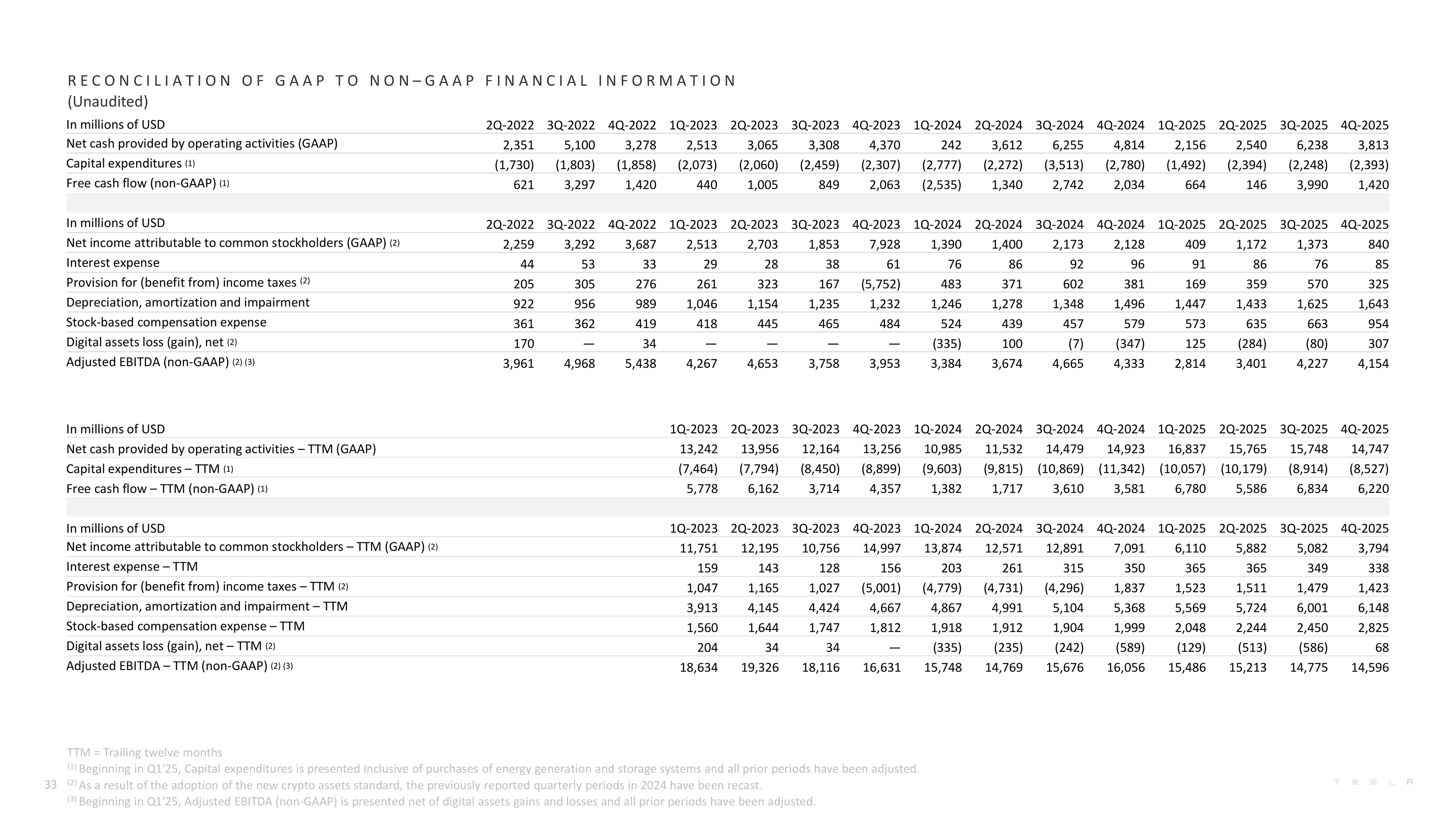
Tesla-Q4-2025-Update.pdf
Integration Guide
Follow the same rhythm as a developer-tool homepage: read the steps once, copy the commands in order, and replace the API key only in step 02.
No config wall, no runtime internals, and no extra surface to learn. Install the package, attach the API key, then enable the plugin.
Add the packaged runtime so OpenClaw can load the bundled knowhere skill.
Connect this OpenClaw instance to your Knowhere account.
Everything else can be pasted exactly as shown. The API key line is the only place where you replace a value.
Turn the entry on so agents can load the plugin inside the runtime.
Install the plugin, point it at your API key, and give OpenClaw a browse-first way to inspect documents before an agent answers.
PDFs, scanned files, tables, manifests, chunks, and raw result files stay reopenable instead of disappearing into one generated reply.
Preview, grep, raw-file reads, ingest, and cleanup become callable in one place.
Agents can reopen manifest, hierarchy, chunks, and raw files before answering.
Result packages stay reusable across session, agent, or global scopes.
