How We Hit 3,000 GitHub Stars in 3 Months — By Doing One Thing MinerU Doesn’t
Parsing a document is only the first step. Knowhere turns it into memory that AI agents can actually use.
In May, we open-sourced the entire Knowhere stack.
Roughly three months later, the project was closing in on 3,000 GitHub stars. We did not expect that kind of response to an infrastructure project built around a decidedly unglamorous engineering problem.

Knowhere is not a flashy product. We did not release a new foundation model or yet another AI productivity assistant. We focused on one of the messiest, most labor-intensive, and most underestimated parts of putting RAG and AI agents into production:
Turning documents into knowledge that agents can actually use.
New users often ask us:
“Isn’t this just document parsing? How is it different from MinerU?”
The short answer is that parsing is where MinerU stops and where much of Knowhere’s work begins.
MinerU Parses Documents. Knowhere Handles What Comes Next.
MinerU is an excellent document-parsing tool. It can extract text, headings, tables, images, and other content from PDFs, then convert the result into Markdown.
But converting a document to Markdown does not make it understandable to an agent.
Once you have the Markdown, the usual next step is to split it into chunks, put those chunks into a vector database, and let an agent or RAG system retrieve them.
The workflow sounds straightforward. In practice, this is where many RAG systems start to break down.
A complex PDF has chapters, nested sections, tables, images, and references that span multiple pages. Converting it to Markdown strips away some of those relationships. Chunking weakens them further, leaving a collection of isolated text fragments.
A chunk may no longer carry the chapter it belongs to, the text that came before or after it, the meaning of an adjacent table, or the connection between an image and the surrounding discussion.
When an agent runs a search, it gets a handful of fragments that happen to resemble the query. It cannot tell that Section 3.2 contains a comparison table, for example, or that the retrieved paragraph is commentary on that table. All it can do is send the highest-scoring fragments to an LLM and hope the model can assemble a useful answer.
This is why simply adding MinerU to a RAG pipeline may not produce the results teams expect. MinerU is doing its job; the missing piece is reconstructing the structure lost when the document was flattened.
Knowhere is not meant to be “the next MinerU.” It is the layer after MinerU, turning parsed content into persistent memory that agents can navigate, cite, and reason over.
How Knowhere Works
We built Knowhere as a memory layer between complex, messy documents and AI agents. Rather than stopping at text extraction, it converts documents into structured memory that can be updated and reused.
Between parsing and vectorization, Knowhere adds a pipeline that reconstructs document structure.
1. Reconstruct the document hierarchy
Knowhere uses tree-based algorithms to recover the relationships among chapters and sections. Each chunk retains its parent heading, position in the hierarchy, and full context path.
2. Process multimodal content
Knowhere applies OCR and generates descriptions for images, while tables are summarized and represented in a structured format. Both remain linked to their source chunks, so an agent can retrieve relevant text along with the charts, tables, or other visual evidence behind it.
3. Build a lightweight memory graph
After splitting a document into chunks, Knowhere preserves its navigation tree, summaries, graph links, and other metadata. Instead of a flat collection of text, the agent gets a knowledge structure it can traverse.
When you upload multiple documents, Knowhere also creates relationships among them, producing a navigable cross-document knowledge graph.
4. Provide agentic retrieval
Traditional RAG relies heavily on vector similarity: retrieve a few fragments, then hand them to an LLM.
Knowhere combines keyword, path, content, and semantic signals. An agent can find a relevant part of a document, follow the section tree and graph links, and return an answer tied to its sources.
5. Preserve original pages as evidence
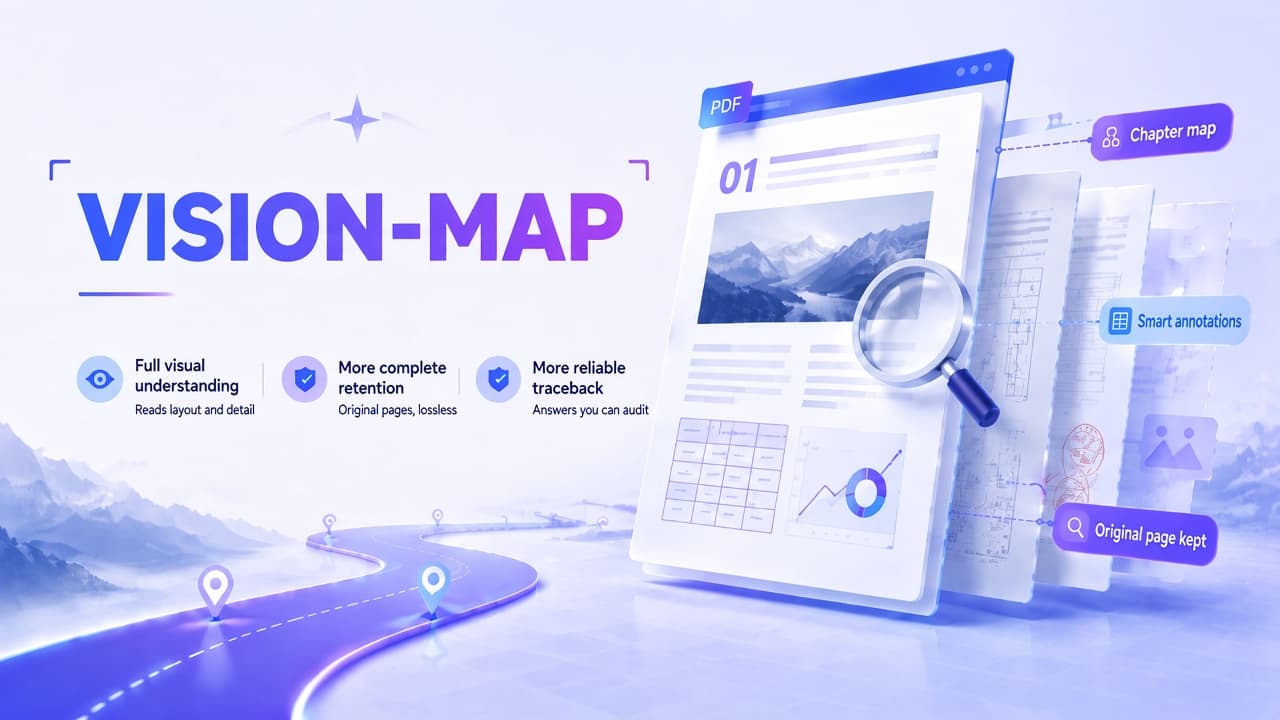
Some content does not translate cleanly into plain text, including scanned documents, complex tables, and engineering drawings. For these cases, Knowhere provides a visual document-understanding pipeline called VISION-MAP. It preserves the original page images and organizes them according to the document’s sections, topics, and content relationships.
Agents can navigate and locate information across documents, while vision models can inspect the original pages directly.
The text pipeline supports fast retrieval, while the visual pipeline lets models check the complete source page. Both feed into the same document map.
That is the step Knowhere takes beyond parsing: MinerU turns PDFs into Markdown; Knowhere turns the parsed output into memory an agent can use. In practice, this covers the path from parsed documents to a working RAG or agent system.

What We Saw in Testing
In an internal evaluation, we asked agents to perform the same search, editing, and question-answering tasks with three different inputs:
- The original documents
- Output from a standard parser
- Structured memory produced by Knowhere
Compared with the baselines, Knowhere’s structured memory produced:
- First-attempt accuracy improved by 36%
- Recall improved by 11%
- With feedback, accuracy reached 79%, compared with roughly 53% when agents worked directly from the original documents
- Agents required fewer iterations, consumed fewer tokens, and completed tasks faster

The difference comes down to structure. With a flat body of text, the agent has little choice but to search blindly. Give it a tree, a graph, and chunks with traceable source paths, and it can work more like a human reader: scan the table of contents, locate the right section, and then examine the details.
Where Knowhere Fits
Knowhere is useful wherever an AI application needs to work with document-heavy knowledge.
Internal knowledge bases
Product manuals, standard operating procedures, FAQs, and training materials rarely arrive as clean text. They are usually spread across PDFs, Word documents, slide decks, and spreadsheets. Knowhere turns these mixed collections into structured, searchable memory.
Technical documentation assistants
Equipment manuals, API documentation, engineering drawings, and maintenance guides tend to be long and complex. Knowhere supports very long PDFs and atlas-style documents, using a layout-aware parser for technical manuals and drawing sets that run to hundreds of pages.
Contract and report analysis
Legal documents, financial reports, procurement documents, and research reports all depend heavily on context. Flat chunking can break references and section logic. Knowhere preserves section paths and source evidence to make retrieval more reliable.
Engineering audit assistants
For scanned contracts, engineering drawings, complex tables, and reports that mix text and visuals, VISION-MAP lets Knowhere inspect the original pages directly.
It can check figures, tables, annotations, and layout relationships against the source page, then return that evidence to the agent. This makes the resulting searches and answers easier to inspect and audit.
Agentic RAG
Many teams want agents to do more than answer questions; they want them to complete multi-step tasks grounded in source material. That requires documents agents can navigate, not a pile of disconnected fragments.
How Does Knowhere Compare with MinerU?
Knowhere is not a replacement for MinerU. It extends the workflow.
MinerU excels at document parsing. It extracts text, headings, tables, images, and other content from PDFs, then produces Markdown or structured output. For many developers, that step alone is extremely valuable.
If your goal is a RAG system or an agent knowledge base, however, parsing is only the beginning. You still need to organize chunks, generate embeddings, build indexes, implement retrieval and citations, and handle document updates.
Knowhere packages those steps into one pipeline, taking parsed output through chunking, embedding, indexing, and retrieval so it can be used directly by an agent.
The main differences are:
- Reconstructing document hierarchy instead of producing only flat text
- Generating structured chunks while preserving their semantic context
- Processing images and tables, then linking multimodal content back to the source
- Indexing and publishing documents to a queryable namespace
- Providing agentic retrieval instead of leaving you to connect parsed text to a vector database
- Supporting document updates, queries, and archiving
- Working across model providers: DeepSeek and Qwen-VL are supported by default, while environment variables let you switch to OpenAI, DashScope, Zhipu AI, ByteDance Volcano Engine, and others
- Remaining fully open source and self-hostable for teams that need to keep data on-premises
MinerU gets the content out. Knowhere makes it usable inside RAG and agent systems.
How to Get Started with Knowhere
There are four ways to get started.
Option 1: Cloud API — the fastest route
Create an account at knowhereto.ai. No infrastructure setup is required.
Install the Python SDK:
pip install knowhere-python-sdk
Parse an online PDF:
import knowhereclient = knowhere.Knowhere(api_key="sk_your_api_key")result = client.parse(url="https://example.com/report.pdf")print(result.statistics.total_chunks)print(result.full_markdown[:500])
Parse a local file:
from pathlib import Pathresult = client.parse( file=Path("report.pdf"), parsing_params={"model": "advanced", "ocr_enabled": True},)print(result.manifest.source_file_name)print(len(result.chunks))print(result.document_id) # Save this ID for future updates or archiving.
Access different chunk types:
# Text chunks with keywords and summariesfor chunk in result.text_chunks: print(chunk.keywords) print(chunk.summary)# Table chunks with preserved HTML structurefor chunk in result.table_chunks: print(chunk.html[:100])# Image chunks that can be saved locallyfor chunk in result.image_chunks: chunk.save("./output/")
Save all results at once:
result.save("./output/report/")
Option 2: Connect it to RAG retrieval
After parsing a document, publish it to a namespace and query it through the retrieval API:
# Step 1: Publish the document to a namespace.job = client.jobs.create( source_type="url", source_url="https://example.com/manual.pdf", namespace="support-center",)job_result = client.jobs.wait(job.job_id)document_id = job_result.document_id # Persist this ID for document management.if document_id is None: raise RuntimeError("Expected document_id after successful publication.")# Step 2: Run a query.response = client.retrieval.query( namespace="support-center", query="How do I reset Bluetooth pairing?", top_k=5, channels=["path", "term"], filter_mode="keep", signal_paths=["Bluetooth", "Pairing"],)print(response.answer_text)print(response.evidence_text)for item in response.results: print(item.content) print(item.score) print(item.source.source_file_name, item.source.section_path)
When a new version of the document becomes available, update it using the same document_id:
update_job = client.jobs.create( source_type="url", source_url="https://example.com/manual-v2.pdf", document_id=document_id,)
Archive the document when you no longer need it:
client.documents.archive(document_id)
Option 3: Self-host it and keep your data on-premises
To deploy knowhere-self-hosted, you will need:
- Docker and Docker Compose
- A MinerU API key for PDF parsing
- An LLM API key from either DeepSeek or Alibaba Cloud Model Studio (DashScope)
Create a .env file in the project root.
For DeepSeek:
MINERU_API_KEYS=your-mineru-api-keyDS_KEY=your-deepseek-api-key
For Alibaba Cloud Model Studio:
MINERU_API_KEYS=your-mineru-api-keyALI_API_KEYS=your-dashscope-api-keyNORMOL_MODEL=qwen-plusHIERARCHY_LLM_MODEL=qwen-plusIMAGE_MODEL=qwen3.6-flashIMAGE_MODEL_MAX=qwen3.6-flash
You can provide multiple comma-separated keys. Knowhere rotates through them automatically to reduce the impact of per-key rate limits:
MINERU_API_KEYS=mineru-key-1,mineru-key-2
If Docker image downloads are slow in mainland China, use the Alibaba Cloud registry:
KNOWHERE_IMAGE=knowhere-registry.cn-shenzhen.cr.aliyuncs.com/knowhere/knowhere:latest
Start the services:
docker compose up -d
Once the deployment is running:
- Dashboard:
http://localhost:3000/login - API health check:
http://localhost:5005/health - API documentation (Swagger):
http://localhost:5005/docs
Useful commands:
docker compose ps # Check service statusdocker compose logs -f app # Stream application logsdocker compose pull && docker compose up -d # Upgrade to the latest versiondocker compose down # Stop services; Docker volumes retain data
The self-hosted version sends anonymous product telemetry by default. It does not include document content, file names, user identities, or other sensitive information. To disable it:
TELEMETRY_ENABLED=false
Option 4: Connect Knowhere to your agent through MCP
If you work in tools such as Cursor, Claude Code, or Codex, Knowhere MCP lets you connect your document library directly to an agent.
Once connected, the agent can search documents, inspect outlines, read chunks, and grep within a document. With Full Access enabled, it can also parse new URLs and local files.
Our new document workspace, Knowhere Brain, shares the same library with MCP. Documents you upload and organize in Brain are immediately available to your agent. Documents the agent parses through MCP are synchronized back to Brain.
You only need to upload each source once instead of providing the same material separately to the web app and your agent.
Here is how to set it up in Cursor.
First, make sure you have Node.js 20.19+ and npm 10+. Then log in from your terminal:
npx -y @ontos-ai/knowhere-mcp login
After logging in, select an access level. Readonly is sufficient if the agent only needs to search your library. Choose Full Access if you also want it to parse new documents, write to Brain, or archive documents.
Then add the following configuration to ~/.cursor/mcp.json:
{ "mcpServers": { "knowhere": { "command": "npx", "args": ["-y", "@ontos-ai/knowhere-mcp"] } }}
Save the file, restart Cursor, and confirm in MCP settings that Knowhere is connected.
You can then ask the agent to use your document library directly:
- “Search my Knowhere documents for this API’s usage limits.”
- “Read the outline of this report and summarize the sections relevant to my current project.”
- “Parse this local PDF into Knowhere, then use it to write a research summary.”
See the MCP documentation for complete setup instructions.
Why This Resonated
Knowhere approached 3,000 GitHub stars in three months because many teams are stuck at the same point: their documents have been parsed, but their agents still cannot use them effectively.
Our goal is to close that gap by organizing Markdown, images, tables, section hierarchies, and cross-document relationships into memory that agents can navigate, cite, and retrieve.
It is not the most glamorous part of building an AI product, but it has an outsized effect on the result. A capable model is only useful if it can access the right knowledge with enough context — and show where that knowledge came from.
If you are building a RAG application, enterprise knowledge base, document Q&A system, or agent toolchain, you can try Knowhere here:
- GitHub: github.com/Ontos-AI/knowhere
- Website: knowhereto.ai
- Brain: notebook.knowhereto.ai
- MCP documentation: docs.knowhereto.ai/mcp